TCLab Setup with an AI Assistant
 |  |  |  |  |
|---|
Objective: Set up the Temperature Control Lab (TCLab), collect your first temperature data, and use a Generative AI assistant to help interpret what you observe. Estimated time: 1 hour.
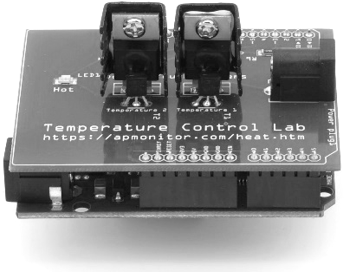
The TCLab is a hands-on lab kit with an Arduino, two heaters, two temperature sensors, and an LED. It is the physical reference for the whole course: models and controllers that work in simulation must also work on this hardware. If you do not yet have a TCLab kit, complete this activity with the simulator apps and repeat the hardware steps when your kit arrives.
Step 1: Connect and Test
- Plug in the TCLab (blue USB for data, white power adapter for the heaters).
- Install the support package from a command line or Jupyter cell:
pip install tclab
- Test the connection by turning on the LED:
import time
with tclab.TCLab() as lab:
lab.LED(100)
time.sleep(5)
lab.LED(0)
If the connection fails, paste the complete error message into the TCLab AI Assistant with this prompt:
With the course TA skill installed, your assistant already knows the tclab package, the USB-vs-power-adapter setup, and the common connection failures, so the troubleshooting goes faster.
Step 2: Collect First Data
Run a 5-minute test with heater 1 at 80%:
import time
import numpy as np
import matplotlib.pyplot as plt
n = 300 # seconds
T1 = np.zeros(n)
with tclab.TCLab() as lab:
lab.Q1(80)
for t in range(n):
T1[t] = lab.T1
print(t, T1[t])
time.sleep(1)
lab.Q1(0)
plt.plot(T1, 'r-', label='T1 (degC)')
plt.xlabel('Time (sec)'); plt.ylabel('Temperature (degC)')
plt.legend(); plt.savefig('first_test.png'); plt.show()
No hardware yet? Use the TCLab Simulation Studio app to generate the same step response in the browser, or replace tclab.TCLab() with tclab.setup(connected=False) to run the digital twin.
Step 3: Interpret the Response with AI
Use these prompts with your plot (attach the image or describe it):
Judgment check: the AI has not seen the actual hardware. Compare at least one of its claims (final temperature, time scale, or cooling mechanism) against your data, and note where it was right or wrong.
What to Turn In
Submit a short report (PDF, about 1-2 pages). You may use Generative AI to help write it, but you must supply the correct plot, numbers, and reasoning. Answer these questions:
- Include your step-response plot (hardware or simulator). What are the starting temperature, the temperature at 300 seconds, and your estimate of where it is heading?
- Why does the temperature respond gradually to a step in heater power? Name the physical mechanisms that carry heat away from the device.
- From the tutor conversation: one question you answered incorrectly and the corrected answer.
- From the judgment check: one AI claim you tested against your data, and the result.
- One sentence: where did AI help you learn faster, and where did you still need your own judgment?